
Peko

For gym owners

Gym management software for Indian gyms.

One app for the owner, branch managers, front desk, trainers and clients. Enquiries, memberships, renewals, payments, PT sessions and reports — for one branch or many.

Two screens, one gym

Peko is on your team's phones and on the desk's computer.

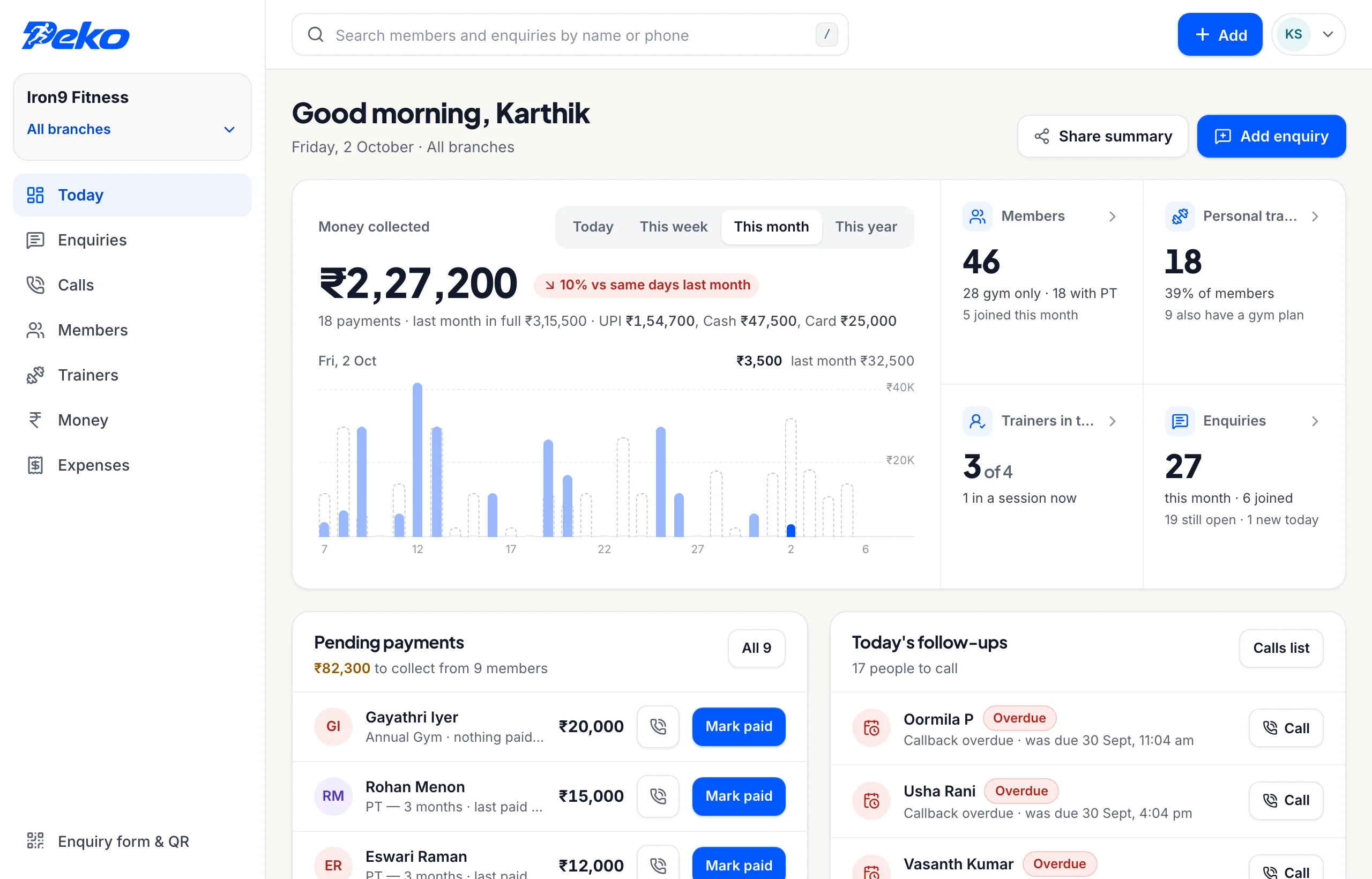
The owner, managers, trainers and members use the app. The front desk gets both — the app on the floor, and the CRM on the big screen for the work that is faster with a keyboard. Included with every gym plan, and nothing to install.

Peko's CRM in a browser: ₹2,27,200 collected this month, 46 members, 27 enquiries, pending payments and today's follow-ups
  • A calling list that says why Every callback with its reason and its money beside it — and the gym's whole enquiry pipeline behind it.
  • Members, in bulk Import the list you already have, add a member with their plan and start date, and find anyone by name or number.
  • Money, with the day's proof Collections, dues, expenses and renewals — the same figures the owner sees on their phone.

What it actually does

Nine things your gym does every day. Pick one.

Front desk

A front desk that never forgets a call.

Every morning the desk opens Peko to a list: who owes money, whose plan ends this week, whose plan is over, which enquiries to ring. Tap Call, and when they hang up, note how it went — the next call is already waiting.

  • Dues, renewals and enquiries on one calling list
  • The best hour to ring, worked out from your own calls
  • Birthdays and gym anniversaries to wish, with one tap
  • A day report to the owner on WhatsApp at closing

More on the front desk

Enquiries

Every walk-in, call and Instagram enquiry followed up.

The desk saves an enquiry with a name and a number, then what they want, their goal, whether they will take a trial and when to ring back. Peko checks the number is a real Indian mobile and warns when the person has asked before.

Each branch also gets its own enquiry link and QR code — for the front door, your Instagram bio or a WhatsApp status. Whoever fills it in lands in Enquiries, and the desk is told.

  • Walk-in trial: yes, no or did not ask
  • Where they heard of you: walked in, Instagram, a friend
  • Save and call now, or a call-back time

How enquiries work

Memberships and renewals

Know whose plan ends before they leave.

Monthly, quarterly, annual or PT packages: add a client at the counter with their plan and start date, and Peko keeps count. The Clients tab shows who owes, whose plan is ending and whose is over — the three lists that decide your renewals.

  • Add a client with their plan in under a minute
  • Bring your existing client list in, in one go
  • Owing, ending soon and plan over, always current
  • Renew on the same card, with what is left to pay

Memberships, dues and renewals

Payments

Payments recorded, receipts sent, discounts approved.

The desk records cash, UPI, card or bank transfer, full or part, and picks who actually took the money — the desk phone is shared. The client gets a receipt on WhatsApp. Up to ₹1,000 off can be given at the counter; anything more goes to you or the branch manager to approve.

  • Part payments, and exactly what is still owed
  • Who collected what, for every rupee
  • Peko records payments and never processes them

How payments work

Trainers and PT

See who is training whom, right now.

Trainers check in with a photo, run their sessions from Peko and mark them done. You see live PT sessions with the minutes elapsed, who has not arrived, who is late and who is on leave — and a leaderboard scored on coaching, not on money.

  • Staff check-in with photo and location
  • Shifts, late arrivals and leave requests
  • Clients without a trainer, flagged for you

Staff and attendance

Opening, closing and the floor

“Who opened today?” answered with a photo.

Whoever opens or closes the gym sends a photo from Peko, with their name and the time. Broken equipment, a cleanliness problem or an incident goes to you the same way — in one place, not buried in a group chat.

  • Gym opened and Gym closed photos
  • Equipment, cleanliness and incident reports
  • Notices to your staff and clients

More on the gym floor

The owner's view

Your gym's numbers, any day of the month.

Collected, pending and overdue; joinings, renewals and where the money comes from — today, this week, this month or the year, for one branch or all of them. Download the month as a PDF report for your partner or accountant.

  • Collections by day, week, month, quarter or year
  • Renewal rate and average per client
  • Business report as a PDF

See a sample report

More than one branch

Every branch together, or one at a time.

Open the second one the day you sign the lease. Peko shows you the whole business or one branch at a time, and each branch manager and front desk sees only their own — its clients, money, staff and enquiries — while you see all of it.

  • The whole business, or one branch at a time
  • Branch managers see only their branch
  • Branch-by-branch collections and renewals

The client app

Give every member your gym in their pocket.

Clients open Peko to their workout for today, their diet plan, their weight journey and your gym's hours and notices. Progress they can see is the best renewal reminder there is.

Inside the client app

Straight answers

Gym owners ask

What is gym management software?

It is the system a gym runs on: enquiries and follow-ups, clients and their plans, payments and dues, trainers and their sessions, and the numbers the owner looks at. Many Indian gyms still run these on a register, WhatsApp groups and an Excel sheet. Peko puts them in one app that the whole team uses.

Can the front desk and the owner use it at the same time?

Yes. Everyone signs in to the same app with their own role. When the desk records a payment, it shows in the owner's collections at once; when a discount needs approval, the owner gets it on their phone.

How do renewal reminders work?

Peko keeps a calling list for the desk: people who owe money, plans ending soon and plans that are over, and enquiries due a call. Each person has Call and WhatsApp buttons, and after a call the desk notes how it went so the next person knows.

Do we need a computer at the front desk?

No — the desk works entirely from a phone, which suits a counter where the desk worker is also on their feet. A web dashboard is being built too; ask about it in your demo.

Can Peko handle GST invoices?

Peko records payments and sends receipts; it does not file taxes or produce GST returns. Keep using your accountant for that — your monthly report gives them the numbers.

Can our PT trainers see each other's clients?

No. A trainer sees the clients assigned to them. The owner and the branch manager see all of them.

See Peko with your own gym in mind.

A 20-minute call. We show you the app on your own gym — your branches, your plans, your prices — answer every question, and set it up with you when you are ready.

  • Nothing to pay to see it
  • We set your gym up on the call itself
  • We call once — no spam, ever

Where should we call? Once, and never passed on.

What do you run?

We call once, on WhatsApp or the phone. We never pass your number on.

Where should we call?

Once, on WhatsApp or the phone. Never passed on, never sold.

See Peko on a call. Free.

WhatsApp us (opens WhatsApp)